Earnings and payouts
See your earnings ledger, choose a payout method, and track when money lands.
What you'll do
This page is a reference. Read it to understand where Kalivar shows your earnings, how payouts are made, and what to expect on cadence and taxes.
Where you see earnings
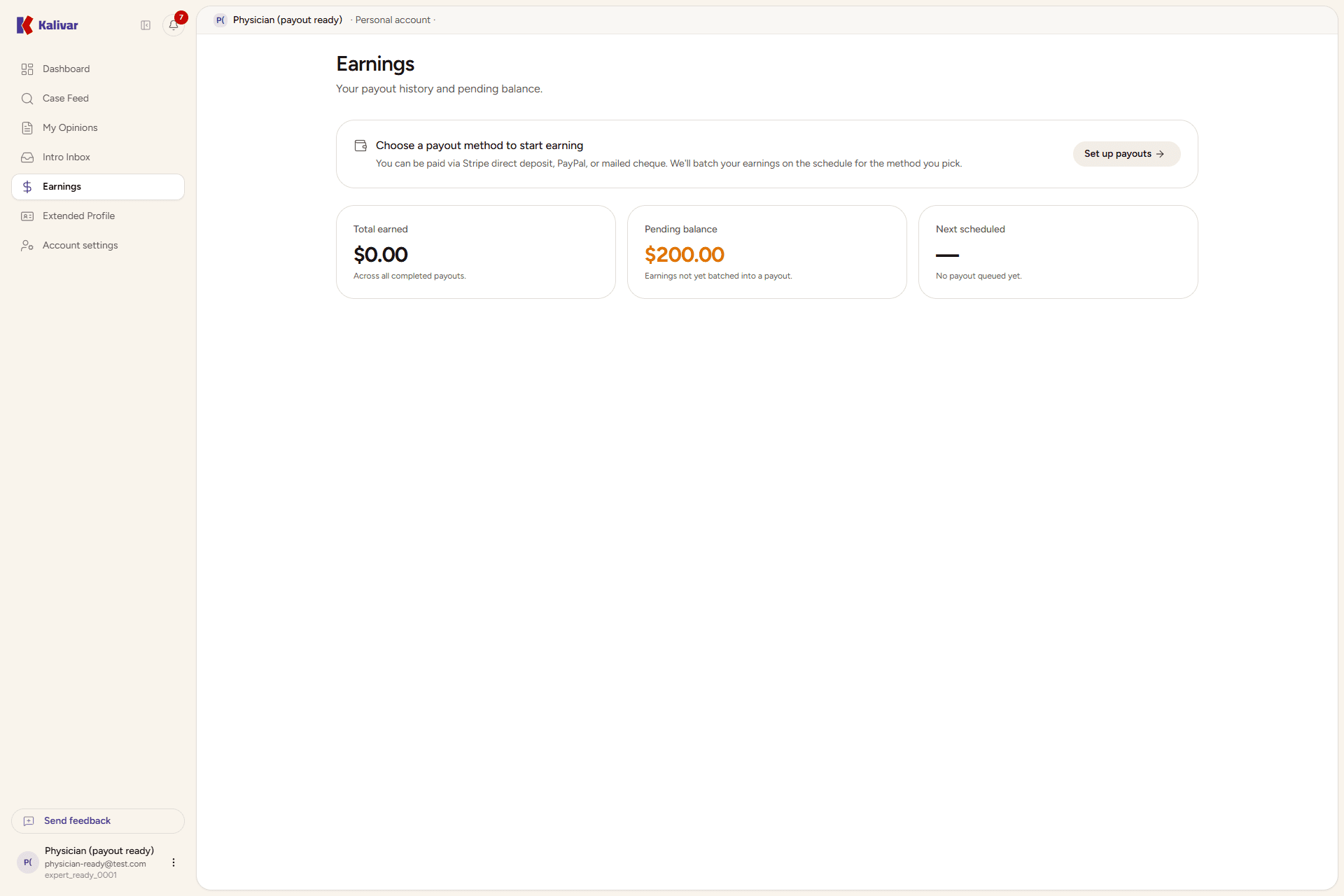
Open Earnings from the sidebar. The page is your single view onto money in:
-
Total Earned — a running total of everything you've been paid through Kalivar, displayed in dollars.
-
Pending Payout — the dollar amount earned but not yet transferred to your bank or payment account. Cases that are accepted but still settling show up here.
-
Recent Payouts — a table of your most recent rewarded opinions, with the date, the case, the dollar amount, and a status badge. Status values are Unpaid, Paid, Failed, and Refunded.
-
Payout setup card — a prompt at the top of the page until your payout account is fully configured. Once it's set up and verified, the prompt disappears and a small footer confirms payouts are enabled.
Payout methods
The first time you open Earnings, a Set Up Payouts card prompts you to choose how you get paid. You pick and manage your method under Settings → Payouts:
- Stripe direct deposit (recommended) — paid straight to your bank account. You set it up through a secure hosted onboarding that collects your bank and identity details.
- PayPal — paid to your PayPal account.
- Mailed cheque — a physical cheque, mailed once a month (on the last day of the month). Cheques carry a small fee and a per-year limit; once you reach the limit, switch to Stripe or PayPal to keep getting paid.
Once your chosen method is set up and verified, payouts route there automatically — you don't pick a destination per case.
Switching methods
You can change your payout method at any time under Settings → Payouts. Most earnings that haven't gone out yet move with you — you don't lose anything by switching, and you don't need to ask us to move them.
When you switch, the page tells you exactly what happened to everything currently queued. There are three possible outcomes, and you may see more than one:
- Reissued — payouts that were waiting to be sent are released and rebuilt on your new method. They go out on that method's normal schedule, once your balance reaches its minimum; below the minimum the balance simply rolls forward until it qualifies. If you switched to cheque, the balance is mailed in a monthly batch instead.
- Already on its way — a payout that was handed to your old provider before you switched completes on that method. We don't recall it, because the money is already moving and pulling it back would delay you. So you may receive one last payout via your previous method after switching. Nothing is lost or duplicated.
- Needs a quick check — occasionally a payout was sent but the provider hasn't confirmed what happened to it. We hold that one and check it by hand rather than reissuing it, because reissuing before we know could pay you twice and create a mess to unwind. Our team follows up with you directly.
Switching changes where new payouts go
It doesn't cancel a payout that has already been handed to your old provider — that one finishes where it started. Expect it to arrive the way it always would have.
Cadence
Payouts are sent automatically on a regular schedule that picks up every Rewarded opinion not yet paid. Once a payout is on its way:
- The funds move to your payout method on its standard timing.
- The dashboard updates the row to Paid once the transfer lands.
- A failed transfer shows as Failed — usually because payout setup is incomplete or your account rejected the deposit. We email you when this happens, with a link to the setting that needs attention. Your earnings are safe in the meantime; nothing is lost.
- Once you've supplied what was missing, the payout is picked up again on the next run automatically — you don't need to ask for it to be re-sent.
Most experts are paid within a few business days of the case closing and the opinion being marked Rewarded; exact timing depends on your payout method. Mailed cheques work differently: they are batched and sent once a month, on the last day of the month, so a single cheque covers everything you earned that month.
Ledger
Each row in Recent Payouts is a payable event tied to a specific case:
- Rewarded opinion — the attorney accepted your opinion when they closed the case. This is the most common ledger entry.
- Completed introduction — a paid introduction the attorney requested and you accepted, after the engagement is marked complete.
- Refund — if a payment was reversed (for example, a rare case where Kalivar refunds an attorney charge that affects an already-credited payout), the row shows as Refunded. Refunds are uncommon and platform support reaches out before any reversal that affects a paid opinion.
The Pending Payout total is the sum of payable rows that haven't yet been transferred. It clears as payouts are sent.
Taxes
Kalivar does not provide tax advice, and Kalivar does not issue your tax forms. You're an independent contractor for tax purposes, and how you report payments from Kalivar depends on your jurisdiction and circumstances.
For Stripe and PayPal payouts, the provider collects the tax information it needs when you set up the account (legal name, address, tax ID) and issues any required year-end form — such as a 1099-K in the U.S. — directly to you. Update those details in the provider's hosted account settings, which you reach from Settings → Payouts. Talk to your accountant or tax professional for anything beyond data entry.
Tips
- Payouts are net of platform fees. The amount on each ledger row is what you receive, not the gross fee the attorney paid.
- Cases that are cancelled, withdrawn, or never closed don't appear in earnings. Only Rewarded opinions and completed paid introductions generate payouts.
- Changing your payout method moves most of what's still waiting to be paid onto the new method. A transfer already handed to your old provider finishes there — see Switching methods.
- If a row stays Failed, finish your payout setup — check the email we sent, which names the exact thing that's missing. The most common causes are a half-completed identity step, an unconfirmed PayPal email, or no mailing address on file for cheques.