Writing opinions
Use the opinion editor to draft, save, and submit your expert read on a matched case.
What you'll do
By the end of this page, you'll have a draft opinion saved on a matched case and a clear sense of when and how to submit it.
Before you start
- An accepted case in your feed. The opinion editor opens from the case detail.
- Time to write in one or two sittings. The editor auto-saves your draft, but a careful first read of the case is worth doing before you start typing.
Reviewed and Rewarded — those are the only outcomes you'll see
Once you submit an opinion, it lands in one of two states from your perspective: Reviewed (the attorney didn't select it for reward on this case) or Rewarded (the attorney accepted your opinion and you're paid). Reviewed doesn't mean your opinion was poor — it usually means the attorney capped the number of opinions they could reward and yours fell outside that cap. Kalivar does not surface a third, harsher status to you.
Step-by-step
-
Open the case from your feed. Read the Case narrative, any Specific questions the attorney asked, the at-a-glance patient and event details, and any attachments. If anything is unclear, post a question on the case — the attorney's answer becomes part of the record and sharpens your opinion.
-
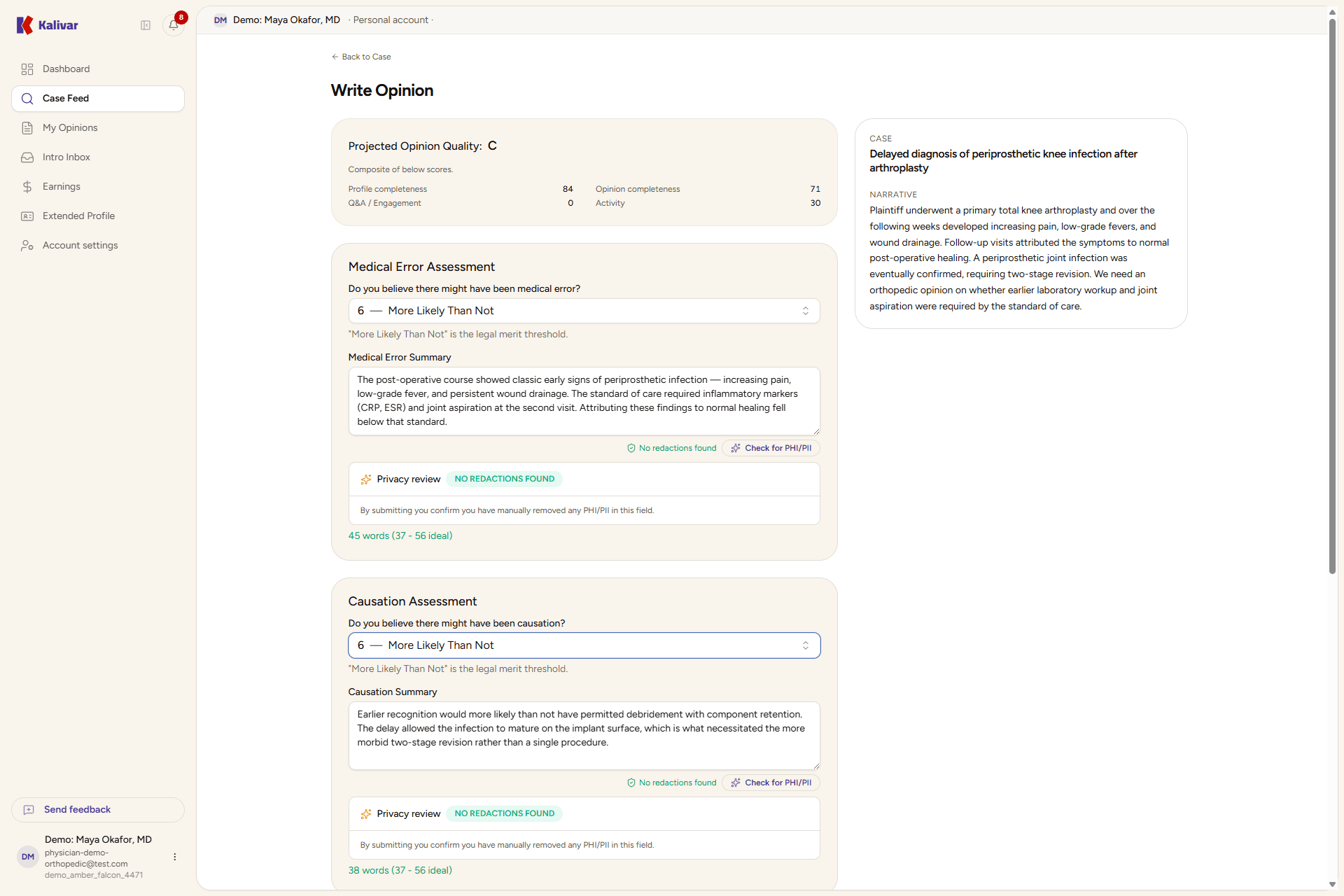
Click Write opinion on the case detail. The editor opens with a side-by-side reference panel showing the case narrative, specific questions, and patient context, so you don't have to flip back and forth.
-
Draft each section. The editor walks you through:
- Medical Error Assessment — pick a likelihood that medical error occurred (1–10) and write a supporting summary. The "More likely than not" threshold is the legal merit standard.
- Causation Assessment — pick a likelihood (1–10) that the medical error caused the harm in the case, and write a supporting summary.
- About your expertise — describe what makes you a good expert for this case (training, board certifications, prior expert work).
- Similar cases in your practice — describe how often you encounter cases like this one in day-to-day practice.
Each summary field shows a live word-count hint and a per-section minimum. The editor highlights anything that looks like patient identifiers (PII or PHI) so you can remove it before you submit.
-
Watch the Projected Opinion Quality card at the top of the editor. It updates live as you write, giving you a sense of how complete and strong your opinion looks so far. The grade is informational — a target to aim at, not a verdict.
-
Save when you need to step away. Save Draft persists the current values; the editor also auto-saves on field blur. Drafts stay in your My Opinions list and on the feed card as "Draft in progress" until you submit or the case closes.
-
Submit when the opinion is ready. The submit step opens a confirmation dialog with a final attestation: you confirm the opinion reflects your honest professional assessment and contains no PII or PHI. The dialog also surfaces a low-quality warning if your projected score is in the low range — a chance to step back and add detail before you commit.
-
After submission, the opinion is immutable. You'll find it in My Opinions; the feed card flips to "Opinion submitted" and the case stays in your In progress tab until it closes. When the attorney reviews opinions and closes the case, yours becomes either Reviewed or Rewarded.
Tips
- The Projected Opinion Quality grade is informational. Treat it as a nudge to be thorough — fuller summaries, a clarifying question on the case, and a complete profile all help — but don't write to the grade at the expense of the opinion itself.
- Drafts are durable. Save and come back; the editor remembers your values and the per-field word counts.
- Submitted opinions are immutable. If something is wrong, contact platform support — there's no edit-after-submit path.
- A clarifying question on the case before you submit usually pays for itself: the attorney's answer sharpens your opinion and lifts your engagement score.