Credentials and profile
Set up your NPI, specialties, education, and fee schedule so attorneys can match with you.
What you'll do
By the end of this page, you'll have a verified credential record, an accurate specialty list, the supporting profile sections that help attorneys evaluate you, and a fee schedule attorneys can read before they reach out.
Before you start
- Your 10-digit NPI number, if you have one. Other clinicians (NPs, PAs, etc.) can skip the NPI step; your credentials are verified during setup.
- The dates of your medical school, residency, and any fellowships.
- Your current rates for record review, deposition, and trial work — at least the ones you're comfortable publishing.
What attorneys see vs. what you write
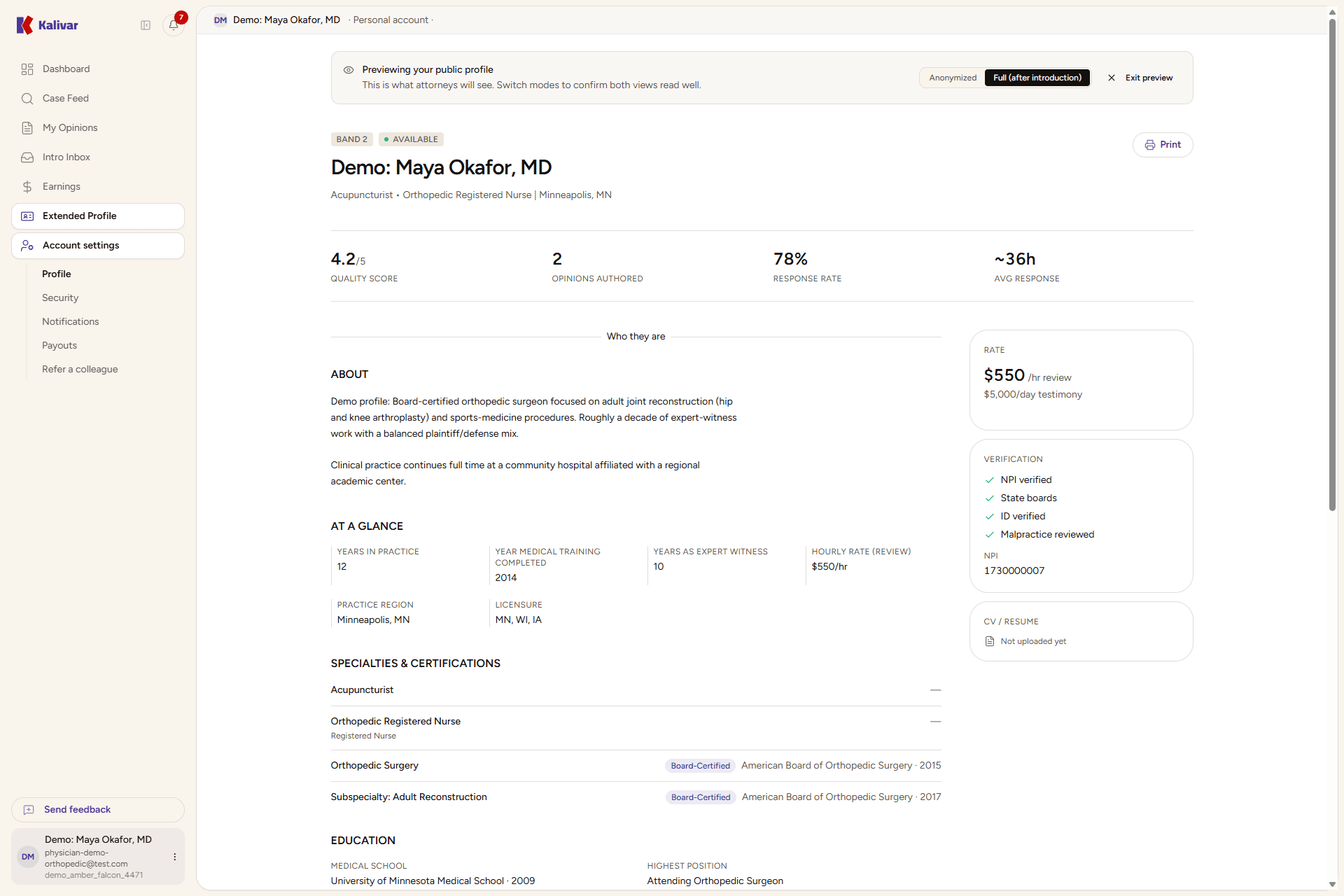
Kalivar matches attorneys to medical experts double-blind: while a case or introduction is unaccepted, attorneys see your specialty, region, fee ranges, and aggregated quality signals — but not your name or contact details. Once an introduction is accepted, your full profile (including CV and links) is revealed for that engagement. Write your sections as if a careful attorney is reading them; your name comes later.
Step-by-step
-
Open Settings from the user menu and go to your profile. The professional sections live under Profile for the basics and Extended profile for the deeper sections attorneys actually read while evaluating you.
-
Verify or update your NPI on the profile page. Kalivar checks it against the NPPES registry; if your registry name differs from the name on your account, you'll see a notice. NPI changes that don't auto-verify are flagged for follow-up — you can re-enter the number at any time to retry.
-
Confirm your specialty list. NPI-derived specialties are pre-selected and locked; add any sub-specialties you also practice (for example, regional anesthesia under anesthesiology). A narrow, accurate list produces stronger matches than a broad one. If your role calls for board certifications, add them under Board certifications on the extended profile.
-
Fill the Education section: medical school, every residency and fellowship, plus your current academic affiliation and most senior position. Education changes are profile updates — they don't trigger re-credentialing or pause your matches.
-
Set your Fee schedule. Enter rates in dollars under each engagement type — medical record review, IME, in-office deposition, in-state trial, and out-of-state trial. Attorneys see ranges in the browse grid; the exact rates are revealed once an introduction is accepted on a case.
-
Open Preview as attorney from the extended-profile page to see how your profile reads from the other side. Your name and contact details are masked the same way attorneys see them while a case or introduction is still unaccepted.
Tips
- Pick your primary specialty narrowly. A single, accurate specialty produces stronger matches than three vague ones.
- Education and CV updates are profile changes — they don't pause matches or trigger re-credentialing.
- Fee changes apply to new opinions and new introductions only. Anything in flight when you change a rate is unaffected.
- The extended profile is optional but highly visible. Filling it out is the easiest way to win cases against equally credentialed peers.