Managing an expert network
Run roster, credentialing, and payout routing for a network of medical experts.
What you'll do
This page is the reference for running an expert network on Kalivar after it's created. Use it to manage your roster, understand how expert credentialing works at the network level, see what your payout options are today, and recognize the lifecycle states a member of your network can be in.
Networks earn — they don't pay
Expert networks have no subscription on Kalivar. Only law firms and solo attorneys are billed. Your network's role is to bring medical experts onto the platform; experts earn from rewarded opinions and accepted introductions on their own accounts.
Network dashboard
When you open your network by slug (/your-network-slug), you land on the network context. The landing surface is a simple network home; the day-to-day administration happens under Settings.
A few things to be aware of:
- The firm-only routes (Cases, Experts directory, Introductions, firm billing) are intentionally hidden for expert networks. Networks don't post cases or pay subscriptions, so those entries don't appear in your nav.
- Network-wide earnings forecasting is not a built-in dashboard today. Each expert on your roster sees their own Earnings page, and you can ask members for visibility — see Payout routing below.
- Switching between your personal context and the network context uses the same org switcher used elsewhere on the platform.
Roster management
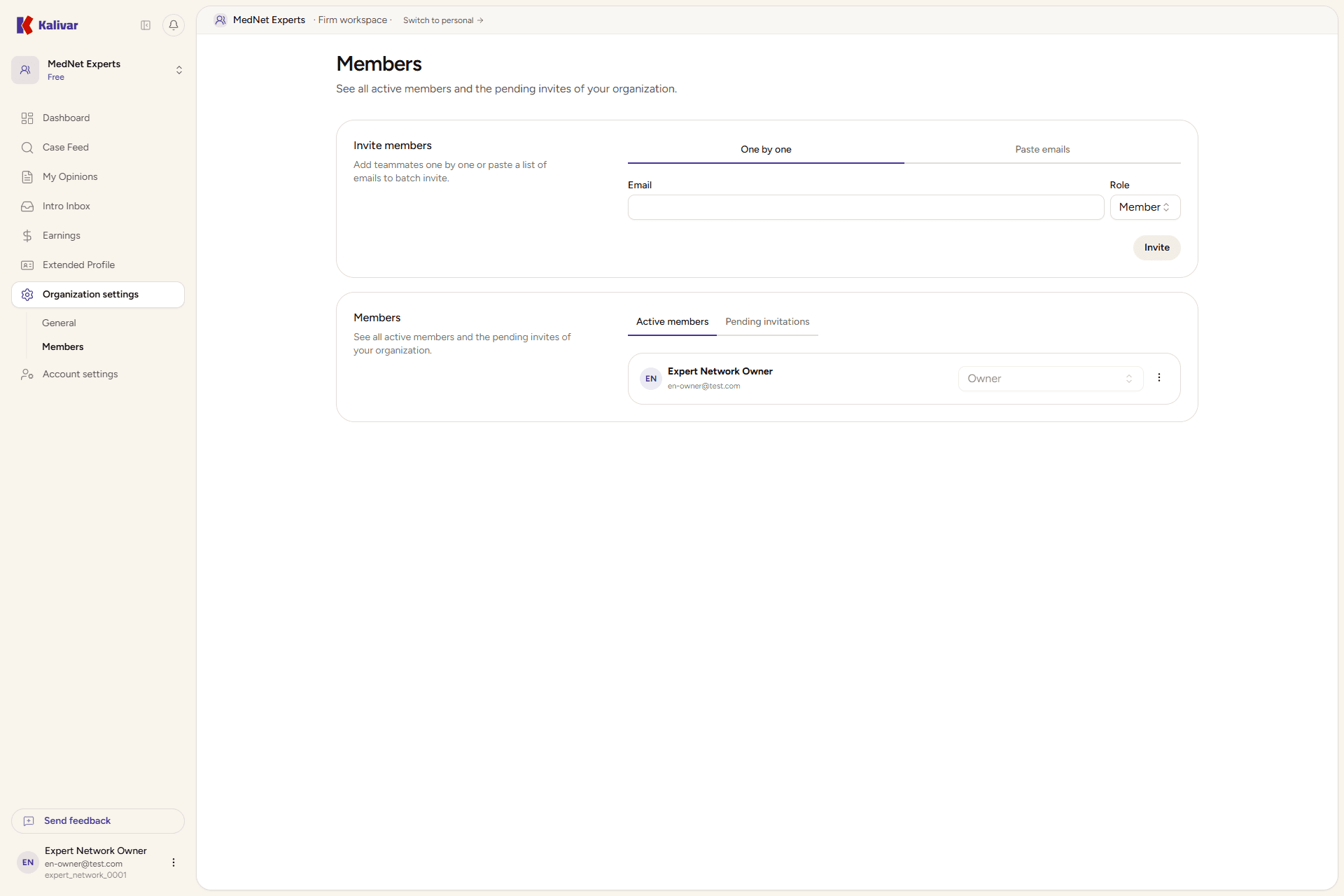
Open Settings → Members under your network to manage the roster.
- Invite a single expert. Enter the medical expert's email and pick a role (member, admin, or owner). They receive an invitation link by email.
- Invite a batch. Use the Batch invite tab to paste multiple expert emails at once when standing up the network. Roles are applied uniformly; you can adjust individual roles later.
- Pending invitations. The members page shows outstanding invitations alongside accepted experts. You can revoke an invitation from the action menu before the recipient accepts.
- Removing an expert. Use the action menu on an expert row to remove them from the network. Removal is immediate and ends their network affiliation, but their personal Kalivar account, NPI verification, opinions, and earnings history are unaffected.
Experts complete their own onboarding
You're inviting the user, not provisioning them. After accepting, the invitee lands on Kalivar onboarding, picks the I'm a medical expert option, verifies their NPI through NPPES, and sets their specialties themselves. The network does not enter credentialing data on their behalf.
Credentialing
Kalivar credentials medical experts at the user level, not at the network level. There is no network-wide bulk credentialing today; each expert you invite goes through the platform's standard credentialing flow:
- They confirm identity and contact details on the About you step.
- They verify their NPI through NPPES — Kalivar pulls the registry record and matches the legal name they entered.
- They list their specialties, which determine the cases that reach their feed.
- They complete their detailed practitioner profile (board certifications, fellowships, hospital affiliations, fee schedule) on their Profile → Extended page.
What the network can see and do:
- The network's affiliation with the expert shows on their public profile alongside the network bio you set on the network profile.
- The network does not see the expert's NPI or PII beyond what's on the members directory; credentialing data is the expert's.
- If an expert's verification is flagged or pending, that is between the expert and Kalivar's review process — the network is informed via the member's status badge but does not act on it.
Payout routing
Payouts go directly to each medical expert's own connected payout account. There is no network-level payout aggregation that intercepts expert earnings before they reach the expert — every rewarded opinion and completed paid introduction goes to the expert's own account on the platform's standard payout schedule.
What this means in practice:
- Each expert sets up their own payouts from their Earnings page; the network cannot complete this on their behalf.
- The network does not need to set up any payout account of its own to onboard experts. There is nothing for the network to enable in order for payouts to flow.
- Changing an expert's payout destination is something the expert does in their own payout account settings. It applies going forward; transfers already initiated for prior opinions are not redirected.
- If your network's commercial agreement with an expert involves the network taking a cut, that arrangement is handled outside Kalivar — the platform pays the expert in full per their fee schedule and the firm's pricing.
Member statuses
A medical expert on your network can be in one of a few states:
- Active. Accepted the invitation and completed their onboarding. They appear as a regular row on the members directory and are matched to cases by their specialties.
- Pending invitation. You sent an invitation but the expert hasn't accepted yet. The row shows under invitations rather than accepted members; you can revoke it before they accept.
- Onboarding incomplete. They accepted the invite but haven't finished credentialing (NPI step, specialties, profile). The platform won't surface them in case matching until their core profile is in place; the row stays in the directory.
- Suspended. A network owner has paused the expert's access to the network context. The member retains their Kalivar account and historical data; reactivating restores access. Note that suspension is enforced for law-firm members today — for expert networks, suspension is not the primary lifecycle tool, and removal is the typical action.
- Removed. No longer on the network. Their personal account, opinion history, and earnings are unchanged.
Tips
- Networks are not billed, so there's no plan tier or invoice to worry about — the entire Billing sub-tree is hidden for expert networks by design.
- Experts keep their full earnings history if they leave a network. Past payouts and rewarded opinions stay on their personal account.
- Payout routing is per-expert, not per-network — once an expert has set up their payouts, every future opinion goes to their account regardless of which networks they're affiliated with.
- An expert can be on multiple networks. Their case feed is driven by their specialties and history, not by the network's directory.