For law firm admins
Get your firm set up, understand your pricing, invite attorneys, and let your team start posting cases.
What you'll do
By the end of this page, you'll have your firm workspace set up, your pricing understood, and attorneys invited and onboarding into your firm.
Before you start
- Authority to enter into a subscription on the firm's behalf.
- A list of attorney email addresses to invite.
- A payment method for billing — or a billing contact and PO process for invoiced Enterprise plans (net terms, not card-charged).
Step-by-step
-
Sign up or sign in with your work email (or continue with LinkedIn), then confirm the verification email.
-
Get your firm provisioned. Firm and expert-network workspaces aren't self-serve — on the role screen ("How will you use Kalivar?"), use the Contact us for volume pricing link, or talk to your account manager, to have your firm set up.
Firms and networks are set up with our team
The self-serve role gate only covers solo attorneys and individual experts. Law-firm and expert-network workspaces are set up with the Kalivar account team. Your account manager will confirm when you're ready to sign in.
-
Once your firm workspace is ready, open it from the organization switcher and complete the firm profile: firm name, address, and the billing contact who should receive invoices and receipts.
-
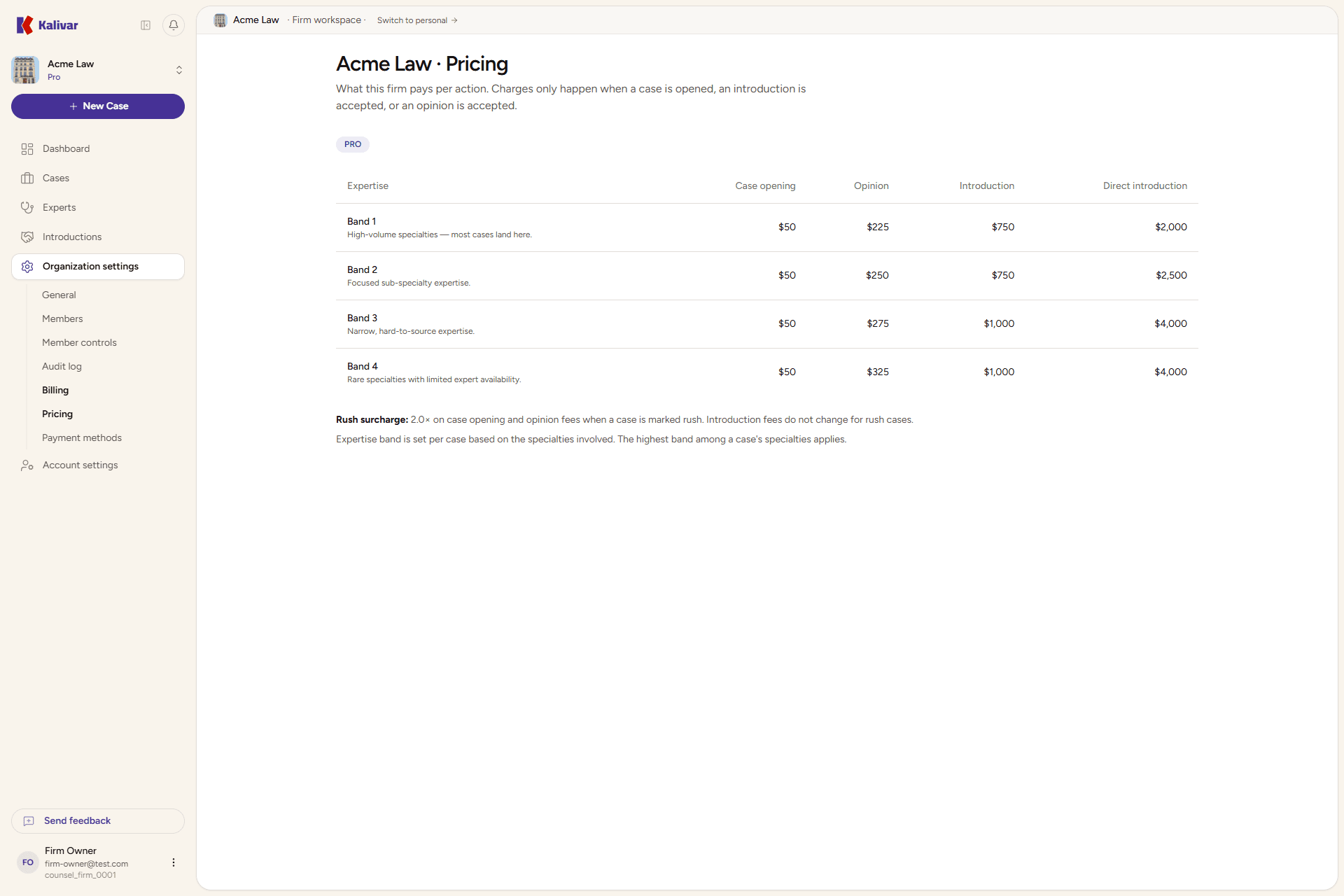
Review your firm's pricing under Settings → Billing → Pricing. Firms are billed per action — case opening, opinion, and introduction — not by subscription seat:
- Pro — the standard rate card, with per-action fees by expertise band and a rush surcharge.
- Enterprise — negotiated per-org rates with custom limits, optionally on invoiced net terms instead of card-on-file.
No PAYG for firms
Pay-as-you-go is reserved for solo attorneys. Firm workspaces are on Pro or Enterprise pricing.
-
Invite attorneys from Settings → Members under your firm. Enter each attorney's email; they'll get an invitation link.
-
Members accept and complete attorney onboarding themselves. They'll see the role gate, choose I'm an attorney, and finish the credentials and About-you steps.
-
Confirm members can create cases. Once they finish onboarding, every case they post bills against the firm's pricing — there are no per-attorney invoices.
Tips
- Moving from Pro to Enterprise involves a quote from your account manager — Enterprise is per-org pricing and invoiced on net terms, not card-charged.
- Enterprise pricing is negotiated with your account manager before your contract is signed.
- Pro includes bundled case volume; if your firm consistently exceeds it, that's the signal to consider Enterprise.
- Removing a member ends their access to firm cases but does not delete the cases they posted.