Reviewing opinions
Score, flag, favorite, and accept the expert opinions submitted on your cases.
What you'll do
By the end of this page, you'll know how to walk the opinions on a case, score them, mark a favorite, flag anything that's off, and select the opinions you want to reward.
Before you start
- A case you posted has at least one submitted opinion.
Reviewed and Rewarded — those are the only two outcomes
Every submitted opinion lands in one of two outcomes: Rewarded (you selected it — the expert is paid) or Reviewed (you didn't select it for this case). "Reviewed" doesn't mean the opinion was poor; it means it didn't fit the cap of opinions you chose to reward on this case. Kalivar deliberately does not surface a third, harsher status to experts.
Step-by-step
-
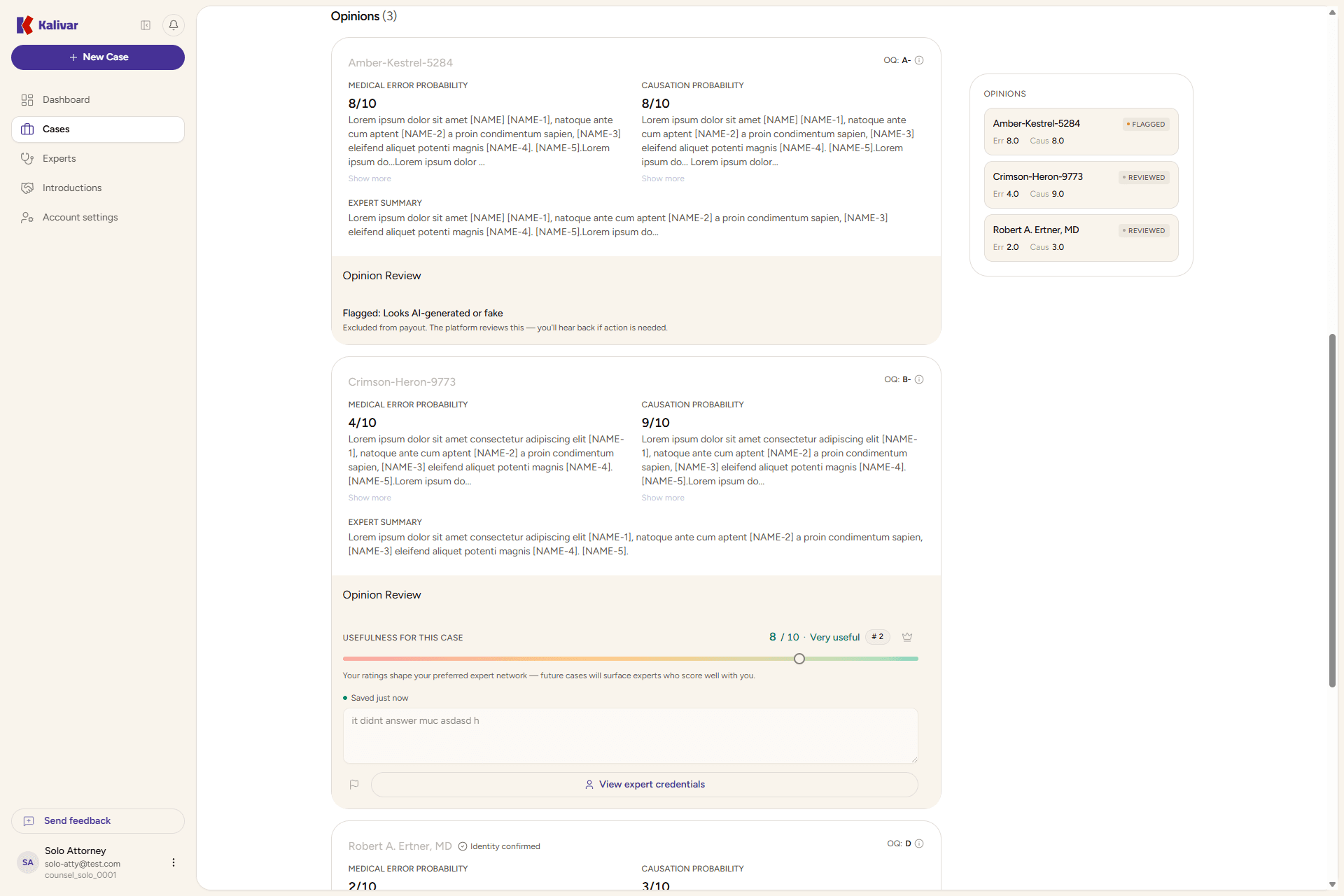
Open the case from Cases, then scroll to the opinions section on the case detail. Each submitted opinion renders as its own review card.
-
Read the opinion's Medical Error Probability and Causation Probability scores (0–10 each), the supporting summaries, and the expert summary.
-
Check the Opinion Quality (OQ) grade in the card header — an at-a-glance quality estimate Kalivar shows to help you triage. It's informational, not a verdict — read the opinion before you trust the grade.
-
Score the opinion. Use the score slider in the Opinion Review section to commit a 0–10 score. You can also leave a private note alongside the score.
-
Favorite the opinion you want to single out. Favoriting is internal to your team — experts don't see it. Only one opinion per case can be the favorite.
-
Flag an opinion you believe is off-policy. Pick a reason (for example, AI-generated, plagiarized, doesn't address the case, lacks credentials, or spam) and the opinion is held and excluded from the reward window while it's reviewed.
-
When you close the case, the opinions you scored and favorited highest are Rewarded — the expert is paid. Opinions outside that reward window are Reviewed.
Tips
- The Opinion Quality grade is informational, not a verdict — read the opinion before trusting the grade.
- Favoriting is internal to your team. Experts never see who you favorited.
- Flagged opinions are held and excluded from the reward window while they're reviewed.
- Your scoring and favoriting drive the reward ranking — opinions outside the ranking still belong to you to read and reference.