Creating cases
Post a case so matched experts can review it and submit expert opinions.
What you'll do
By the end of this page, you'll have a new case posted, visible to matched medical experts, and waiting for opinions to come in.
Before you start
- Solo attorneys: an active plan or PAYG balance. Firm members are covered by their firm's plan.
- The case facts ready to summarize — de-identify per HIPAA before you paste anything in.
A note on patient privacy
Kalivar keeps matching double-blind: experts don't see your client's identity, and you don't see expert identities until an introduction is accepted. Don't include patient, physician, or staff names in any free-text field. Kalivar highlights identifiers it spots, but you're the last line of defense.
Step-by-step
-
Open Cases from the sidebar.
-
Start a new case from the create-case action at the top of the list.
-
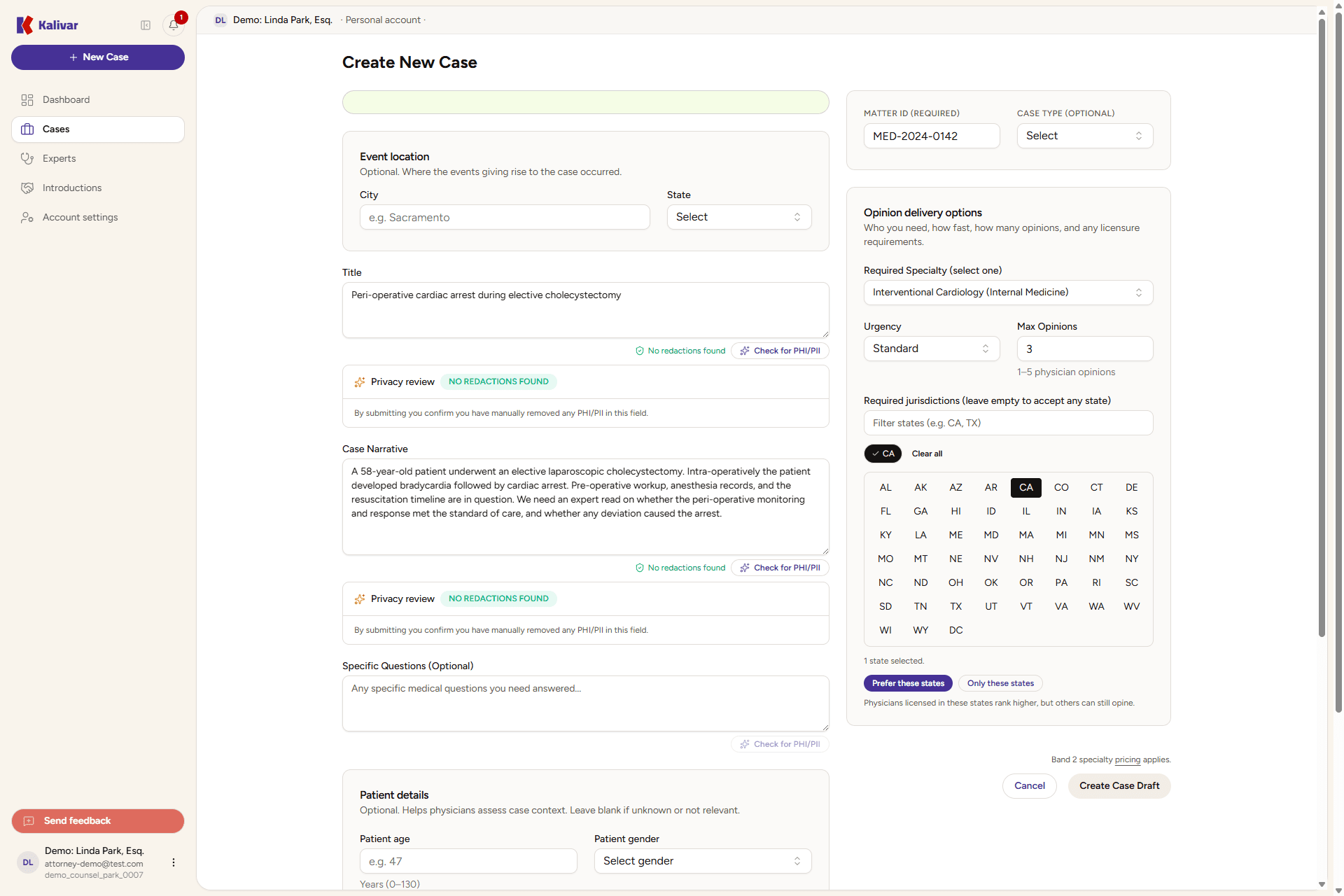
Fill the form. The fields you'll touch:
- Title — a short factual headline. Lead with the medical event, not a legal theory.
- Case Narrative — the case facts you want an expert to read, with enough detail to assess merit.
- Specific Questions (optional) — narrow medical questions you want each opinion to address.
- Required Specialty (required) — the medical specialties most relevant to the case. Search for one, or switch between the MD/DO and NPP tabs to choose a physician or a non-physician medical expert (nurse practitioner, physician assistant, and similar). You can add more than one specialty; each shows as a removable chip and your case matches an expert who holds any of them. Pick the most specific option that fits — a precise specialty reaches better-matched experts. Use the Patient population control above the picker (Adult / Pediatric / Neonatal / Adolescent / Geriatric) to reach age-specific experts — e.g. Neurology + Pediatric reaches child neurologists. See Choosing the right specialty.
- Expand the search if my case stalls (on by default) — if few experts respond, Kalivar also reaches a broader set of experts so your case still gets read. Turn it off to keep the case to your exact specialty.
- Urgency — Standard or Rush.
- Max Opinions — how many expert opinions you want, between 1 and 5.
- Required jurisdictions (optional) — the U.S. state(s) you care about. Leave empty to accept any state. Once you pick states, choose Prefer these states (experts licensed there rank higher, but others can still opine) or Only these states (limits the case to experts licensed in at least one of them).
- Event location (optional) — the city and state where the events occurred.
- Patient details — age, gender, past medical history (PMH), and past surgical history (PSH). These help experts frame the case.
- Matter ID (required) — your firm's internal reference for the case.
- Case Type (optional) — Medical Malpractice, Personal Injury, or Other.
-
Submit the form to create the case draft. From the case detail you can attach images or short videos, then publish the case so matched experts see it.
-
Track the case through its lifecycle. Cases move through Draft, Open, Closed, and Archived — the case-status badge on the case header shows where you are.
Tips
- A clear, factual narrative gets faster, higher-quality opinions. Lead with the medical question.
- Pick the most specific specialty for stronger matches.
- Cases stay double-blind: your client's identity is never exposed to experts.
- You can post multiple cases in parallel; experts are matched independently per case.
- Save the draft first, then come back to attach files — attachments are added on the case detail, not on the create form.